In short.
Cycles is the fixed time frame in Collabase Projects. A cycle bundles start, end, goal and backlog, and calculates whether you are ahead or behind from the work items. If scope grows during the run, that shows as a line in the burndown.
Start, end, goal
Every cycle has a fixed time span and the work that belongs to it
Added scope in sight
When work is added, the cycle reports it as growth since the start
Status without handwork
Ahead and behind are calculated by the cycle from the work items
Part of Projects
No extra module and no second line in the contract
When mid-week nobody can say whether the date holds.
The work runs on a board, the goal sits in a presentation, and the status is assembled on Friday by asking around. When work is added during the run, it only shows once the date slips. A cycle ties the time span, the goal and the work together and calculates the status from them.
Halfway through the run nobody knows whether the release holds at month end.
Additional work arrives during the run and only shows at the very end.
For the status report someone counts work items by hand.
What you gain.
A cycle with a span and a scope
A cycle carries a start, an end and the work items meant to be finished in that time. Active, upcoming and completed cycles sit in the same view, with the progress share next to each one.
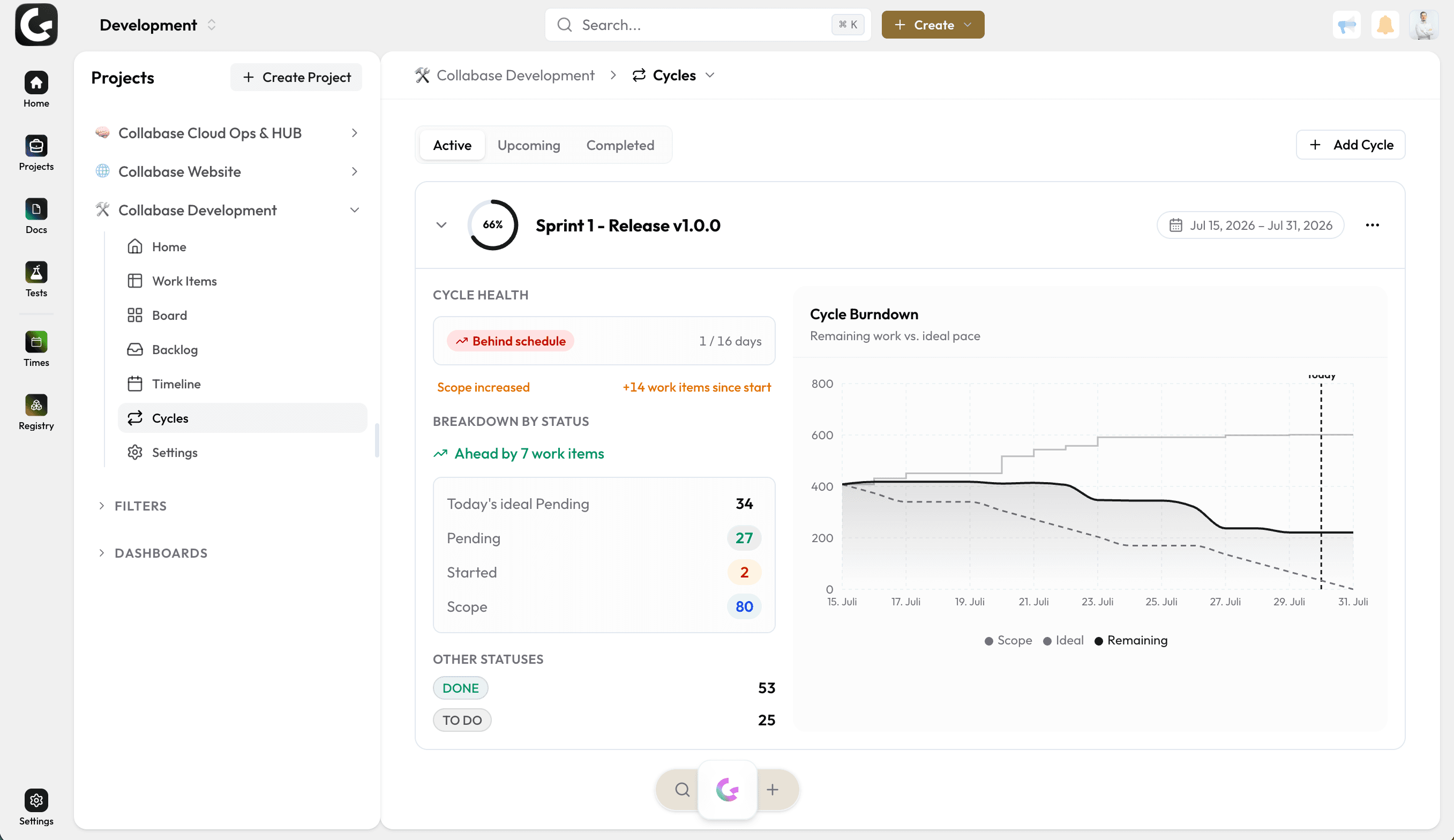
A burndown that draws the scope
The chart shows three lines: the scope, the ideal pace and the remaining work. That separates a delay from an increase in scope, instead of reading both as being behind.
Cycle health instead of gut feel
The cycle states whether it runs ahead of plan or behind it, how many days of its span have passed and how many work items have been added since the start. The status report is ready before the meeting.
Completed cycles stay
Every completed cycle keeps its chart. Anyone planning the next span can see how much work actually got finished in the same duration.
Where it pays off.
Release planning
Fixed date, fixed scope, visible remainder until the deadline.
Campaign waves
Marketing plans in waves with a start and end date instead of open lists.
Quarterly initiatives
Business units tie their initiatives to a span with a target date.
Management
Several running cycles side by side, without anyone collecting numbers.
Cycles belongs to Projects.
A cycle bundles work items from Projects. Time on them runs through Time, defects from Test Management land in the running cycle, and the Automation Engine reports the closing. Every app shares login, permissions and data. One contract, one deployment, one contact.

Docs

Projects

Intranet

Registry

Test Management

Automation

Time
Operations and data sovereignty.
Where the data sits is decided by the operating model, not by the small print.
Swiss hosted
Operated on Swiss public cloud at Infomaniak, one isolated environment per customer. Content is processed in Switzerland only, apart from the upstream web application firewall.
Self-hosted
Runs on your own infrastructure. Full control over the data, no access from outside.
revFADP & GDPR
Data processing agreement included. Compliant with the revised Swiss data protection act and the GDPR.
One product, all apps.
Collabase Enterprise
On request
Staged by user count
Cycles is part of the Enterprise plan. All seven apps, no add-ons.
Questions from first conversations.
Cycles in practice: what comes up most often in a first conversation.
What is the difference between a cycle and a sprint?
A cycle is the fixed time frame together with the work that belongs to it, and it works across all apps. A sprint is that same cycle under the name an engineering team uses for it.
Does anyone have to maintain the burndown?
No. The cycle calculates whether you are ahead or behind from the work items themselves. There is no second spreadsheet that someone updates each morning.
Is added scope visible during the cycle?
Yes. When work is added, the cycle reports it as an increase since the start, and the scope line in the burndown shows when it arrived.
Is Cycles part of Projects?
Yes. Cycles is part of Projects and operates on the same work items as the board, the backlog and the roadmap.
Plan a cycle with your own team.
In the proof of concept we set up Cycles for a running initiative, with your work items and your time span.