In short.
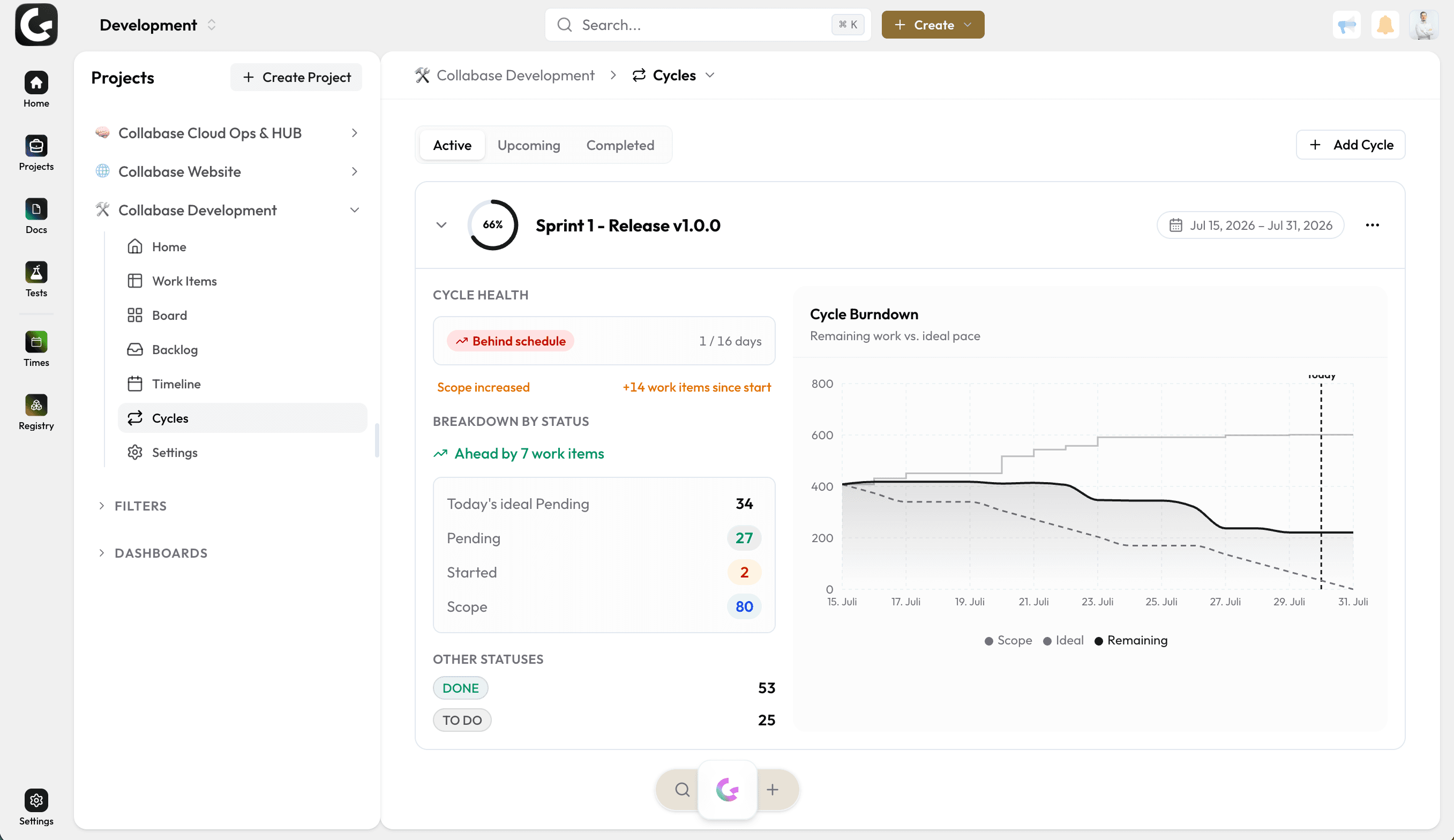
Sprints are the iterations in Collabase Projects. Goal and backlog come before the start, the sprint records its commitment at the start, and unfinished work returns to the backlog on completion. Velocity comes from the last six sprints.
Planned, active, completed
Several sprints may sit in planning, exactly one is active at a time
The commitment is captured
At activation the sprint records its story points, anything later counts as added scope
Carry-over at completion
Whatever stays open goes back to the backlog or into the next sprint
Velocity over six sprints
The average of the last six completed sprints carries the next plan
When every plan starts from nothing again.
The team takes on what looks like two weeks of work, and a third of it is still open at the end. Next time the same estimate comes up again, because nobody wrote down how much actually got finished. A sprint records commitment and result and turns them into a number you can plan with.
Work is left over every time, and nobody knows how much it was last time.
Open work is moved into the next round by hand and quietly disappears.
The plan has no number that comes from this team.
What you gain.
Goal and scope before the start
A sprint carries a name, a start, an end and a goal in one sentence. Work items come in from the backlog, by dragging or through the field on the item itself. While it is still in planning, changing it costs nothing, and several planned sprints may sit side by side.
Activation captures the commitment
Before activation Collabase shows how many work items and how many story points sit in the sprint. Confirming captures that state. Everything added afterwards is recognisable as scope added since the start, instead of quietly mixing into the commitment.
Completion leaves nothing behind
At completion Collabase lists everything that did not reach a done status and asks where it goes: back to the backlog, or into one of the planned sprints. After that comes the summary: work items completed, story points delivered, and the comparison with the sprints before.
Parents and subtasks stay together
Two settings per project decide whether subtasks follow their parent into a sprint and whether a parent follows its subtask. With both off and the parent already in a sprint, Collabase asks when you create the subtask instead of deciding silently.
Who this pays off for.
Development teams
Two weeks, one goal, and a number at the end that carries the next plan.
Agile coaches
Commitment and result sit next to each other per sprint, with nobody taking notes.
Project leads
Velocity shows what a team actually finishes within a given period.
Business departments
Work can be bound to fixed rounds without any software development involved.
Sprints belong to Projects.
A sprint bundles work items from Projects and shares its time span with the cycle that draws the burndown for it. Time against the work items runs through Time, defects from Test Management land in the running sprint, and the automation engine reacts to activation and completion. All apps share login, permissions and data. One contract, one deployment, one point of contact.

Docs

Projects

Intranet

Registry

Test Management

Automation

Time
Operations and data sovereignty.
Where the data sits is decided by the operating model, not by the small print.
Swiss hosted
Operated on Swiss public cloud at Infomaniak, one isolated environment per customer. Content is processed in Switzerland only, apart from the upstream web application firewall.
Self-hosted
Runs on your own infrastructure. Full control over the data, no access from outside.
revFADP & GDPR
Data processing agreement included. Compliant with the revised Swiss data protection act and the GDPR.
One product, all apps.
Collabase Enterprise
On request
Staged by user count
Sprints is part of the Enterprise plan. All seven apps, no add-ons.
Questions from first conversations.
Sprints in practice: what comes up most often in a first conversation.
How many sprints can run at once?
Several sprints may sit in planning, but exactly one is active. That keeps it unambiguous what the backlog, the reporting and the velocity currently refer to.
What happens to work added after the start?
At the start, the sprint records its story points as the commitment. Anything added afterwards is reported as scope added, rather than quietly folded into the commitment.
Where does unfinished work go?
On completion it returns to the backlog or moves into the next sprint. The team makes that call while closing the sprint; the system does not decide it.
How is velocity calculated?
From the average of the last six sprints. That figure carries the next planning session instead of an estimate made from memory.
Plan the next sprint on your own numbers.
In the proof of concept we set up sprints for a team that is already running and show velocity on your work items.