In short.
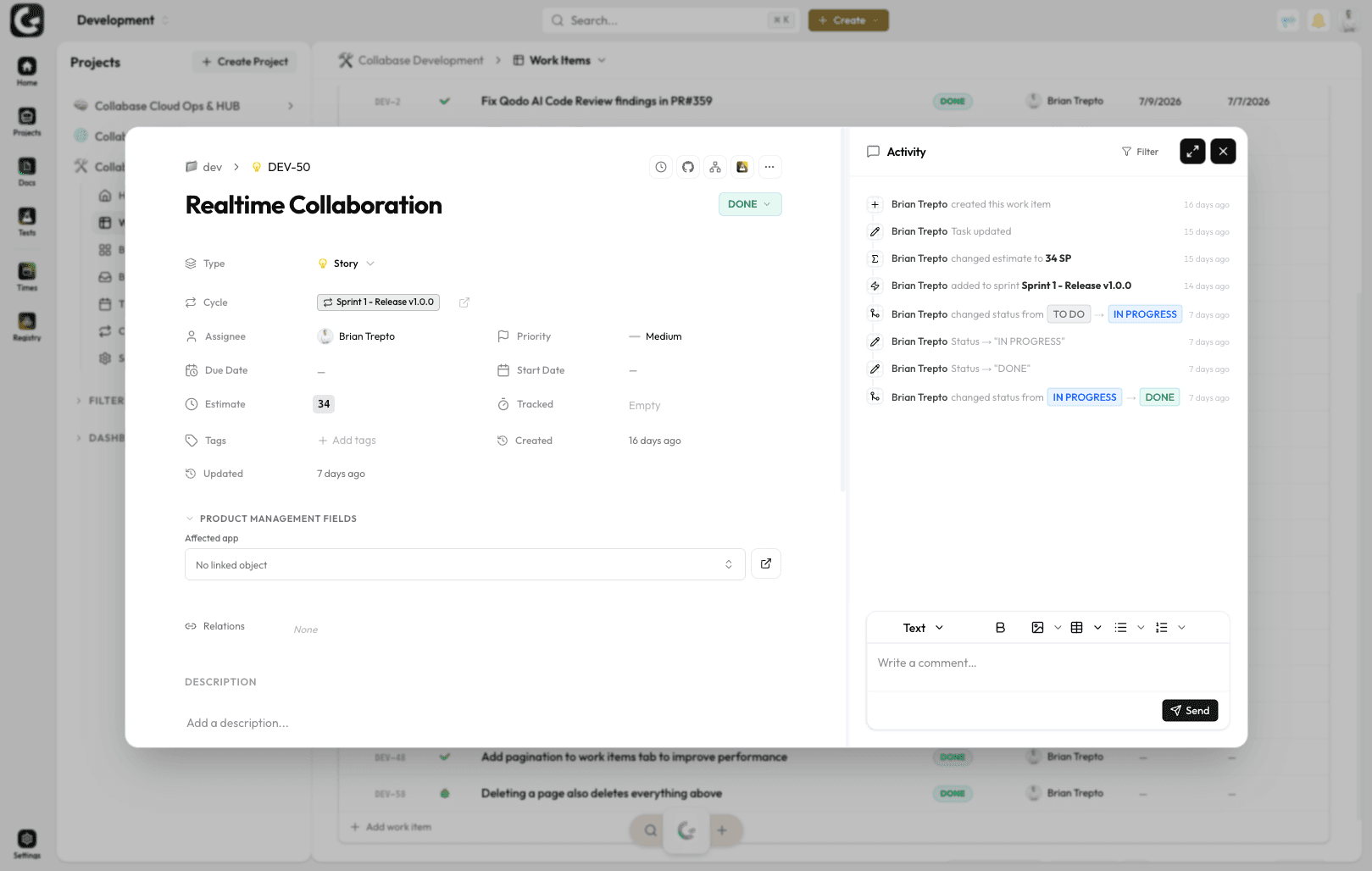
Work items are the records in Collabase Projects: task, bug, requirement or ticket. Each carries a permanent key, fields according to its type, subtasks, four kinds of link and a gap-free history. Comments carry their visibility, internal or for the customer.
A permanent key
PROJ-42 belongs to this work item for good and is never handed to another one
The type decides the fields
Each type has its own required fields, hidden fields and field order
A history without gaps
Every field change is recorded with the person and the timestamp
Internal or for the customer
Every comment carries its visibility, external ones appear in the customer portal
When the state of one piece of work is spread across four tools.
The requirement is in a document, the date in a spreadsheet, the question in a chat and the file in an inbox. Anyone who wants the current state has to ask. A work item holds field, text, file and history together, and whoever opens it sees the whole story.
The last question sits in a chat and cannot be found two weeks later.
Nobody can show who moved the due date, or when.
The thread with the customer and the thread inside the team cover the same thing twice.
What you gain.
Fields that match the work
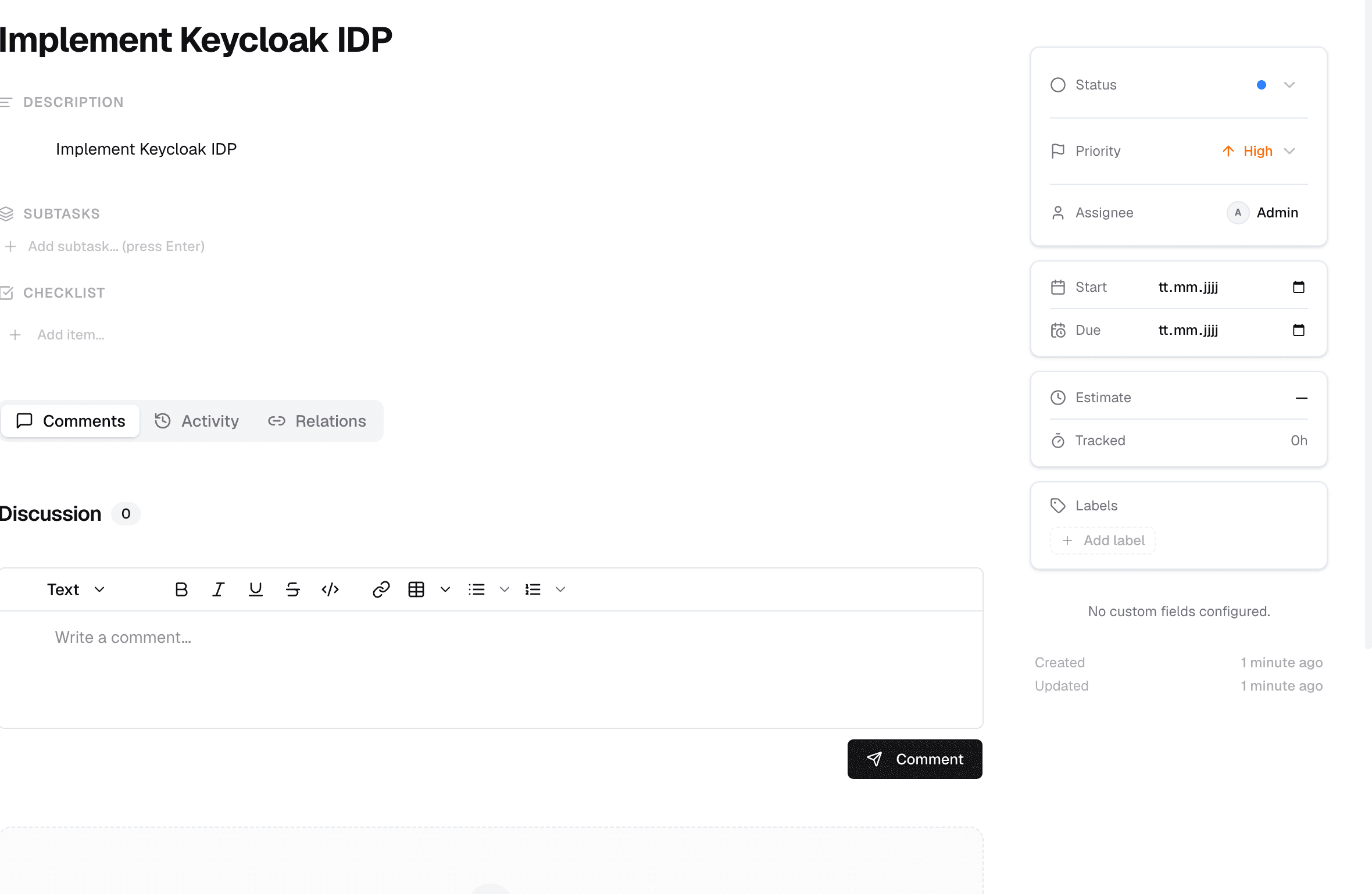
Key, title, status, type, priority, owner, start and due date, labels. Plus the estimate in whichever method your project uses: story points, T-shirt sizes or hours. Custom fields come on top per type, from select and date through to a reference to a registry record.
Subtasks and links
A work item sits under another one or points at one: depends on, blocks, relates to, duplicates. In the list, subtasks sit indented under their parent; on the board they are cards of their own. When the parent moves into a cycle they follow, if the project is set up that way.
Comments with a visibility
Every comment is internal or external. Internal stays inside the team, external appears in the customer portal. The conversation with the customer runs on the same work item as the conversation inside the team, without anyone sharing the wrong line.
A move without a break
A work item can change project, including a project in another space. Collabase maps every status onto a column in the destination and shows before the move which field values have no home there. The old key still opens the item, so links in comments and bookmarks keep working.
Who this pays off for.
Product development
Requirement, bug and subtask share one backlog instead of three lists.
Service desk
The answer to the customer and the internal check hang off the same case.
Quality assurance
Test cases point at the work item they cover, and their result sits next to it.
Audit and review
The history evidences every change with person and timestamp, with nobody rebuilding it.
Work items belong to Projects.
A work item lives in a project and therefore in a space. Time against it runs through Time, test cases from Test Management point at it, registry records hang off it as a field, and the automation engine reacts to every status change. All apps share login, permissions and data. One contract, one deployment, one point of contact.

Docs

Projects

Intranet

Registry

Test Management

Automation

Time
Operations and data sovereignty.
Where the data sits is decided by the operating model, not by the small print.
Swiss hosted
Operated on Swiss public cloud at Infomaniak, one isolated environment per customer. Content is processed in Switzerland only, apart from the upstream web application firewall.
Self-hosted
Runs on your own infrastructure. Full control over the data, no access from outside.
revFADP & GDPR
Data processing agreement included. Compliant with the revised Swiss data protection act and the GDPR.
One product, all apps.
Collabase Enterprise
On request
Staged by user count
Work Items is part of the Enterprise plan. All seven apps, no add-ons.
Questions from first conversations.
Work Items in practice: what comes up most often in a first conversation.
Does a work item keep its key forever?
Yes. PROJ-42 belongs to that work item permanently and is never reissued. References from commits, documents and conversations stay valid years later.
Why does every type show different fields?
Because the type decides the fields: its own required fields, hidden fields and its own order. A bug asks for different information than a requirement, without forcing both into one form.
Can customers see our internal comments?
No. Every comment carries its visibility. Only the ones marked external appear in the customer portal; internal ones stay with the team.
Can we trace who changed a field?
Yes. Every field change is recorded with the person and the timestamp, without gaps. That is what answers the later question of when a case reached a given state.
Put a real initiative into a work item.
In the proof of concept we set up types, fields and permissions for the way you work, with your own content.